
Office Docs: Word Processor & Reader for Microsoft Office - PDF Maker1.1 - App Store
You'll be able to see results in few seconds.
Publisher Description
**PRICE REDUCED FOR TODAY $1.99*
This app lets you create and edit professional quality documents, arrange your documents in an easy to use file manager and share documents with others through a variety of easy methods.
THE BEST DOCUMENT EDITING AND MANAGEMENT SUITE FOR IPHONE AND IPAD.
+ Create and Edit Rich Text Documents on your iPhone or iPad.
+ Work on your documents even when you are not connected to the internet.
+ Convert your documents to PDF,
+ Send documents as EMAIL ATTACHMENTS
+ Transfer to/from your PC or Mac through USB
+ Synch your documents with Dropbox, Google Drive or FTP.
+ View Word & Excel files (Office 2007/2008/2010)
+ VIEW PowerPoint, PDF, iWork, Text, .RTF, and more!
+ Open & Edit files created through this app from any 3rd party app that supports the Open In feature
+ Create or Download Documents from anywhere and carry it with you wherever you go
FREE CUSTOMER SUPPORT:
Customer support available through email, free of cost.
SEND EMAIL TO INFO@NEXSCIENCE.COM for any support questions.
DOCUMENT EDITOR FEATURES:
View/Edit/Create Rich Text Documents
Fonts, Styles,Font Sizes
Bold, italic, Underline, Strike out
Text Color, Background Color selection
Text Alignment
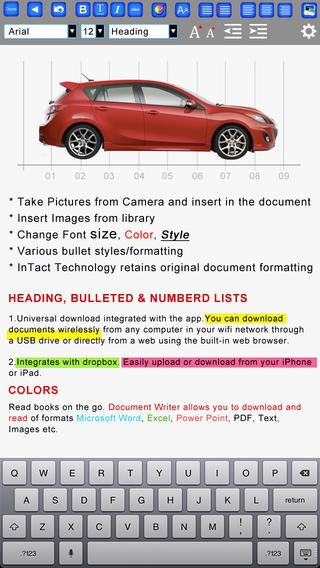
Import Pictures from your Photo Library and paste in the documents
Take Pictures from Camera and insert in the document
Various bullet styles/formatting
Auto bullets/numbers
Undo Changes
Easy Copy and Paste
PDF ANNOTATION FEATURES:
Draw sketches in your PDF documents.
Write hand-written notes or comments or highlight text in your PDF documents.
Fill out PDF Forms and send through email.
Sign & Send Documents - Receive documents through email, sign them using this app and send back through email. This feature is useful when someone sends you a document to sign. You don't need to print the document, sign it and then scan and email. Using this app you can sign & send documents instantly. Saves time and money.
PDF To Go VIEWING Features:
Thumbnail, Fit to Screen, Fit to Width, Actual Size & full screen views
Go to/rotate page
Search
Multiple Bookmarks
Printing PDF Files to AirPrint Printers in your wifi network
Email Attachments
SHARING
Send Documents as Email Attachments
Open Files that comes to your email as attachment
Dropbox
Google Drive
FTP
FOLDERS & SUB-FOLDERS
Create Folders & Sub-folders
Delete, Rename files
Drag and Drop files to Move them across folders
WEB BROWSER:
The app includes a full feature web browser that you can use to download documents, pictures, audio or text files directly into the app.
APPLE TV and EXTERNAL MONITOR SUPPORT
Connect to Apple TV or external monitor (setup required)
Enjoy reading on large external monitors or Apple TV
USABILITY FEATURES
Smooth User Interface
Drag & Drop Files
Google upload & download
Dropbox upload & download
Creates files that can be opened and edited in Microsoft Word, Apple TextEdit, Notepad, Openoffice, Browser & all leading office suites.
Create, View & Manage Documents and eBooks
Works anywhere online or offline.
Professional Look & Feel optimized for iPhone and iPad screen sizes
Free updates
SOME USES
Lightweight office work on the go
Backup of documents
Quick access to Documents, Spread sheets, Presentations, notes and memos
word processing
Pocket Spreadsheet
Pocket Presentation
DOCUMENT TEMPLATES
* Sample Resume
* Sample Cover Letter
* Meeting Minutes Template
* Business Plan for Small Businesses
* Weekly/Monthly Planner
* Contract for the Sale of Goods
* Resignation Letter Sample
* Power of Attorney
* Weekly Time Sheet
* Agenda Sample
* Statement of Services
* Budget Sheet
* Collection Demand Letter
* Blog Post Sample
And many more
SAMPLE EMAILS
A large collection of ready-to-use sample emails in the following categories
Business
Employment
Complaints
Marketing
Personal
Requires iOS 4.0 or later. Compatible with iPhone 3GS, iPhone 4, iPhone 4s, iPhone 5, iPhone 5c, iPhone 5s, iPhone 6, iPhone 6 Plus, iPhone 6s, iPhone 6s Plus, iPhone SE, iPhone 7, iPhone 7 Plus, iPad, iPod touch (3rd generation), iPod touch (4th generation), iPod touch (5th generation), and iPod touch (6th generation).
About Office Docs: Word Processor & Reader for Microsoft Office - PDF Maker
The company that develops Office Docs: Word Processor & Reader for Microsoft Office - PDF Maker is Irfan Farooqi. The latest version released by its developer is 1.1.
To install Office Docs: Word Processor & Reader for Microsoft Office - PDF Maker on your iOS device, just click the green Continue To App button above to start the installation process. The app is listed on our website since 2013-11-05 and was downloaded 0 times. We have already checked if the download link is safe, however for your own protection we recommend that you scan the downloaded app with your antivirus. Your antivirus may detect the Office Docs: Word Processor & Reader for Microsoft Office - PDF Maker as malware if the download link is broken.
How to install Office Docs: Word Processor & Reader for Microsoft Office - PDF Maker on your iOS device:
- Click on the Continue To App button on our website. This will redirect you to the App Store.
- Once the Office Docs: Word Processor & Reader for Microsoft Office - PDF Maker is shown in the iTunes listing of your iOS device, you can start its download and installation. Tap on the GET button to the right of the app to start downloading it.
- If you are not logged-in the iOS appstore app, you'll be prompted for your your Apple ID and/or password.
- After Office Docs: Word Processor & Reader for Microsoft Office - PDF Maker is downloaded, you'll see an INSTALL button to the right. Tap on it to start the actual installation of the iOS app.
- Once installation is finished you can tap on the OPEN button to start it. Its icon will also be added to your device home screen.
Program Details
System requirements
Download information
Pricing
Version History
version 1.1
posted on 2013-11-05
Disclaimer
Official App Store Link
We do not host Office Docs: Word Processor & Reader for Microsoft Office - PDF Maker on our servers. We did not scan it for viruses, adware, spyware or other type of malware. This app is hosted by Apple and passed their terms and conditions to be listed there. We recommend caution when installing it.
The App Store link for Office Docs: Word Processor & Reader for Microsoft Office - PDF Maker is provided to you by apps112.com without any warranties, representations or guarantees of any kind, so access it at your own risk.
If you have questions regarding this particular app contact the publisher directly. For questions about the functionalities of apps112.com contact us.
